Category: Vuejs

  • How Law Firms Are Using AI to Reduce Research Time by 70%

    How Law Firms Are Using AI to Reduce Research Time by 70%

    Reading Time: 3 minutes

    One of the most time-consuming portions of a lawyer’s job has always been doing legal research. It can take a lawyer hours or even days to find the appropriate answer by going through case laws, statutes, judgments, comments, and precedents.

    But in 2025, the legal field is going through a big change.

    AI-powered legal tools are helping businesses cut down on research time by as much as 70% without sacrificing accuracy.

    This change is huge for law firms that are getting more cases, having to meet stricter deadlines, and facing more competition.

    Why Legal Research Takes So Long

    Lawyers are slowed down by traditional research methods since they depend on

    • Searches for keywords by hand
    • Going through hundreds of examples that don’t matter
    • Reading long judgments from start to finish
    • Looking at different decisions that are at odds with each other
    • Putting complicated legal terminology into simpler terms
    • Checking again to make sure the jurisdiction is correct
    • Even with online libraries, research takes a lot of time for people to read and understand.

    What happened?

    Getting ready for cases takes longer, productivity goes down, and prices go up.

    How AI Is Changing the Way Lawyers Do Research

    AI doesn’t take the place of a lawyer’s knowledge; it makes it stronger.

    Modern AI tools are educated on big sets of case laws, statutes, and legal commentary. This lets them do research jobs in minutes instead of hours.

    Here’s how businesses are adopting AI to speed up their research process:

    1. AI-Powered Case Retrieval: Get the Right Precedents in Seconds

    Lawyers can now conduct the following instead of running dozens of keyword searches:

    • Ask questions in plain language
    • Get the right case laws right away
    • Choose by court level, jurisdiction, and time frame
    • Find precedents that have been missed

    AI doesn’t only look for things; it also knows the legal context, which makes searches far more accurate.

    2. Summaries of Automated Judgments

    Judgments might be more than 50 to 200 pages long.

    AI tools can make them shorter in:

    • bullet points
    • List of issues that are organized
    • ratio decidendi
    • influence of precedent

    It used to take half a day, but now it only takes 3 minutes.

    3. Making Legal Arguments

    AI helps lawyers write:

    • lists of issues
    • Questions on the law
    • structures of arguments
    • references to supporting cases

    This offers the lawyer a great place to start and cuts down on the time it takes to write the first draft.

    4. Mapping for Compliance and Statutory Purposes

    Law firms often have trouble with:

    • old citations
    • missing changes
    • wrong references to the law

    AI systems automatically map key laws and let lawyers know when they change, making sure that research is accurate and follows the rules.

    5. Case Insights that Predict

    Some powerful AI tools look at prior decisions to give:

    • Chance of outcomes
    • Pros and cons of arguments
    • Important trends in the courts

    These insights help lawyers create better plans and build stronger arguments.

    The Result: Research is up to 70% faster

    Companies that use AI are saying:

    • 70% less time spent on research
    • 2–3 times faster at getting ready for the first case
    • More accurate citations
    • Better consistency between teams
    • Increased strategic bandwidth for top lawyers
    • Less time looking. More time to contemplate.

    That’s what really matters.

    What This Means for Law Firms: More Work That Can Be Billed

    Lawyers can now spend less time on manual research and more time on analysis, client strategy, and getting ready for court.

    Faster Case Turnaround

    AI speeds up the process of preparing cases, which lets firms take on more cases without hiring more people.

    Better Experience for Clients

    Customers get answers faster, clearer paperwork, and results that are more likely to happen.

    Better Competitive Edge

    Companies who use AI now will have a technological edge that other companies will need years to catch up to.

    AI-assisted legal research is the way of the future, not AI-dependent research.

    AI won’t take the place of attorneys; it will take the place of old ways of doing things.

    Companies who see AI as a partner in speed, precision, and efficiency will be the real winners.

    Ready to Modernize Your Legal Research Workflow?

    πŸ‘‰ Sifars builds AI-powered legal research and document intelligence solutions that help law firms work smarter, faster, and with greater accuracy.

  • Building Enterprise-Grade Systems: Why Context Awareness Matters More Than Features

    Building Enterprise-Grade Systems: Why Context Awareness Matters More Than Features

    Reading Time: 3 minutes

    When teams start working on enterprise-grade software, their first thought is usually to add additional features, such as more dashboards, more automation, and more connectors. But in real businesses, having features alone doesn’t add value. A powerful enterprise system is one that can grasp context, which includes the rules, limitations, workflows, hierarchies, and real-world settings in which it works.

    Enterprise systems don’t work alone. They run departments, help people make decisions, keep things in line, and transport important data. Even the most feature-rich solution can appear distant, stiff, or even unusable if it doesn’t know what context it is in.

    Why Features Alone Aren’t Enough

    A product can have all the latest features, including AI-driven insights, automated workflows, and connections to popular tools, and still not operate in a business. Why? Businesses don’t need generic tools; they need tools that can be used in their own unique situations.

    A procurement system that doesn’t know about approval hierarchies, a CRM that doesn’t care about regional compliance, or an analytics platform that doesn’t grasp industry language can slow things down instead of speeding them up.

    Features get people’s attention, but context makes them use them.

    What it Means to Be Context Aware

    Context awareness is when a system can understand the world around it. It means that the software knows:

    How teams decide things

    What norms and restrictions they have to obey

    How departments talk to each other

    What exceptions happen a lot

    What kinds of words and data types are used in the business

    This deep understanding makes the system act more like a smart partner and less like a tool that doesn’t change. What happened? Adoption happens faster, there are fewer mistakes, and workflows that feel natural to real users.

    When Context Awareness Has the Most Effect

    1. Automating Workflows

    Automated workflows that don’t take into account role hierarchy or local regulations cause confusion and extra effort. Context-aware automation changes to fit the structure of each department and makes sure that every step is in line with how the business really works.

    2. Suggestions from AI

    AI is not reliable without context. To make decisions that teams can trust, models need to know what the organization’s goals are, what the data means, what the limitations of compliance are, and what the user wants.

    3. Checking and keeping data safe

    Businesses depend on having correct data. Context-aware validation stops bad inputs by knowing what “correct” means for a certain use case, area, or sector.

    4. Can be used by more than one department

    A context-aware system scales organically because it picks up on patterns that happen over and over again in different teams. Instead of having to rebuild things over and over, teams add to logic that already knows how they operate.

    5. Personalization without a mess

    Context lets you personalize things in an organized way, so various teams can have their own experiences without messing up the main structure.

    Why context is more important than ever in the age of AI

    AI has made software run quicker, but it can also be more dangerous if it doesn’t have any context. When big models make predictions without knowing the laws of the business, the results might be quite bad: policy violations, bad choices, or insights that don’t match up.

    AI needs structured knowledge, guardrails, fine-tuned instructions, and contextual decision frameworks to build enterprise-grade systems today. Only then can it give results that are safe for businesses and reliable.

    AI without context is just noise.

    When AI has context, it becomes smart.

    Making systems that change, not just work

    Businesses are always changing: new rules, new departments, new product lines, and new ways of doing things. A system that focuses on features gets old quickly.

    A system that knows what’s going on grows with the business.

    Tools with the most features won’t be the future of business technology.

    It will belong to tools that know why, how, and when those traits are important.

    Ready to build smarter, context-aware enterprise systems?

    πŸ‘‰ Partner with Sifars to design AI-driven solutions that adapt to real business logic, scale safely, and stay relevant as your organization evolves.

  • Top Engineering Mistakes That Slow Down Scaling β€” and How to Avoid Them

    Top Engineering Mistakes That Slow Down Scaling β€” and How to Avoid Them

    Reading Time: 2 minutes

    People frequently think of scaling a product as a big step, but the actual problem isn’t growthβ€”it’s growing without destroying what currently works. A lot of businesses have a hard time at this stage, not because their idea isn’t good, but because their engineering wasn’t ready for growth.

    These are the most typical mistakes teams make when they grow, and how to avoid them before they become greater problems.

    1. Thinking of Early Architecture as Permanent

    It’s perfectly fine if most goods start with a simple configuration. When the same architecture is pushed too far, that’s when the trouble starts. As more people use the code, tightly coupled code, rigid structures, and fragile dependencies start to make development slower.

    The answer isn’t to start using microservices too soon; it’s to create systems that can change. Your product can develop without generating instability if you use a modular approach, make sure there are clear boundaries between components, and refactor slowly and on purpose.

    2. Allowing Technical Debt to Build Up

    In places where things move quickly, teams typically put speed ahead of quality. “We’ll fix it later” becomes a mantra, but then it’s too late to correct it. Technical debt doesn’t merely slow down development; it makes every modest modification a costly, risky job.

    The best engineering cultures set aside a certain amount of time throughout each sprint for maintenance, refactoring, and cleanup. This continuous pace of improvement stops big rewrites and keeps the product flexible.

    3. Scaling without being able to see

    A lot of teams think that scaling involves adding more servers or making them bigger. To really scale, you need to know how the system works when it’s under real pressure. Teams work blindly without the right monitoring, logs, and dashboards, which means they have to guess instead of figure things out.

    After a certain point, observability is not an option. Teams can fix problems before users see them by using clear metrics, dependable warnings, and regular tracking.

    4. Not being able to see database bottlenecks

    When things get bigger, the first thing that needs to be corrected is the database. Even with good technology, searches might take a long time, indexes can be missing, and it can be hard to find data.

    For a system to be scalable, it needs to regularly check requests, cache data when it makes sense, and partition data in a way that makes sense. These changes will keep the experience fluid, even when more people use it.

    5. Doing things by hand

    When teams grow, doing things like deployments, testing, and setups by hand can slow things down without anyone noticing. Releases take longer, there are more mistakes, and developers spend more time fixing bugs than adding new features.

    Automated testing, CI/CD pipelines, and environments that are always the same make it possible for teams to ship with confidence and at scale.

    Scaling isn’t about getting more resources; it’s about making better engineering decisions.

    Most problems with scalability don’t happen all at once. They grow stealthily, concealed under cheap fixes, old buildings, and systems that aren’t documented. The sooner a team learns to be disciplined in architecture, testing, monitoring, and documentation, the easier it will be to scale.

    Need guidance on building systems that scale smoothly?

    πŸ‘‰ Connect with us to audit your current setup and get a clear roadmap for scalable, future-ready engineering.

  • Vuejs: Constants from back end API

    Vuejs: Constants from back end API

    Reading Time: 2 minutes

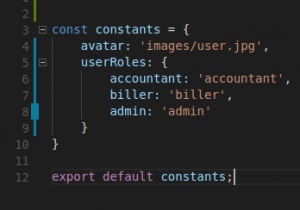
    Hardcoded values make a developer’s job hectic if these are repeated at several places in the codebase. That is why constants are an indispensable part of an application. It’s easy and intuitive to keep your application constants in a separate file and import them in other files to use.

    Vue Js Constants
    import constants from 'path_to_file/constants.js'


    But what when your constants reside on the backend and you need to get them by making an ajax request to the server. how would you make sure that these constants are available before any of your components get rendered? Should we write the received constants object into a file and then export it. It doesn’t sound like a real solution. Of course, it is not.

    Object Prototype

    So let’s approach it with a real-world solution. First, we need to understand function constructor and its prototype. In javascript, each object created using a function constructor has access to its prototype.

    /** 
     * A function to create other objects. We captialize its name to distinguish 
     * it from other normal functions.
     */
    function Person(firstname) {
      this.firstname = firstname;
    }
    
    
    // Add a property to its prototype
    Person.prototype.printFirstName = function() {
      console.log(this.firstname);
    }
    
    // Create two different objects using the function as constructor
    let person1 = new Person('Munish')
    let person2 = new Person('John')
    

    Since person1 and person2 are created using a function constructor so it has access to the printFirstName method.

    person1.printFirstName()   // Munish
    person2.printFirstName() // John
    

    Vue Instance Prototype

    We will use the same concept by fetching our constants object from backend and then putting it into Vue prototype. So that each component in our application has access to this property.

    axios.get('http://SERVER_ADDRESS/getConstants')
    .then(function(res) {
    
      Vue.prototype.$constants = res.body.data;
      // Initialize the main instance once you receive the constants from backend
      new Vue({
        el: '#app'
      })
    
    });
    

    Now you can access this constant object in any of your Vue components using the following syntax

    this.$constants.someConstant
    

    Note:

    Make sure your getConstants API doesn’t do any heavy lifting other than returning your constants. Because the front end application will not get bootstrapped until it responds back.