Category: Angular Js

  • The Silent Bottleneck: How Decision Latency Hurts Enterprise Performance

    The Silent Bottleneck: How Decision Latency Hurts Enterprise Performance

    Reading Time: 4 minutes

    Many companies blame performance problems on visible factors such as limited resources, slow teams, outdated technology, or increasing market pressure. To improve productivity, organizations invest heavily in new tools, infrastructure, and talent.

    Yet despite these investments, many businesses still feel like they are moving too slowly.

    Projects take longer to launch.
    Opportunities pass by unnoticed.
    Teams remain busy, but progress feels slower than expected.

    In many cases, the real issue is not effort or capability.

    The hidden problem is decision latency enterprise performance.

    Decision latency refers to the time between when information becomes available and when a decision is actually made. At first, it may appear harmless. However, when delays accumulate across teams, approvals, and leadership levels, they create a silent bottleneck that slows execution across the entire organization.

    How Decision Latency Appears in Real Organizations

    Decision latency rarely appears as a dramatic system failure. Instead, it emerges gradually as organizations grow more complex.

    You may notice it when:

    • teams wait days or weeks for approvals despite having the required data
    • multiple stakeholders review the same decision without clear ownership
    • meetings are scheduled to align on decisions already discussed
    • leadership delays action while requesting additional data
    • teams postpone execution while waiting for perfect information

    Individually, these situations appear reasonable. Collectively, they slow execution dramatically.

    Teams are not idle. People are working hard. But progress becomes heavy, slow, and fragmented.

    Why Decision Speed Declines as Companies Grow

    As organizations expand, decision complexity increases. Unfortunately, decision speed often decreases even faster.

    Several structural issues contribute to this challenge.

    Fragmented Information

    Modern enterprises generate enormous volumes of data. However, that data is often scattered across dashboards, CRMs, ERPs, spreadsheets, emails, and internal platforms.

    Decision-makers spend more time verifying information than using it.

    When leaders are unsure whether the data is complete or reliable, decisions naturally slow down. This is one of the reasons why leadership dashboards don’t drive better decisions, because visibility alone does not eliminate uncertainty.

    The problem is rarely a lack of data. The problem is a lack of trust in the systems delivering it.

    Unclear Decision Ownership

    In many organizations, it is unclear who truly owns a decision.

    Responsibility is shared, but authority remains vague.

    This creates several problems:

    • decisions move upward unnecessarily
    • teams wait for approvals instead of acting
    • executives become involved in operational decisions

    When ownership is unclear, decisions do not move forward. They simply circulate between teams.

    Risk-Averse Processes

    Enterprises often introduce additional approval layers to reduce risk.

    Over time, these layers accumulate:

    • legal reviews
    • compliance checks
    • executive sign-offs
    • cross-functional alignment meetings

    While these processes are designed to protect the organization, they can unintentionally slow response times to market changes, customer needs, and internal challenges.

    Speed and control are not opposites, but poorly designed processes often treat them that way.

    The Hidden Cost of Decision Latency

    Decision latency rarely appears directly in financial reports, yet its impact is substantial.

    It often leads to:

    • missed market opportunities
    • slower product launches
    • higher operational costs
    • frustrated and disengaged teams
    • reactive leadership behavior

    Employees spend more time preparing updates, presentations, and justifications than executing meaningful work.

    Momentum slows, and sustained growth becomes harder to achieve.

    In highly competitive markets, the cost of waiting too long to make a decision often exceeds the cost of making an imperfect one.

    Why More Tools Don’t Solve the Problem

    When organizations experience slow decision-making, they often respond by introducing more technology.

    Examples include:

    • analytics platforms
    • reporting tools
    • workflow systems
    • AI-driven dashboards

    However, tools alone rarely improve decision speed.

    If approval structures remain unclear and workflows poorly designed, technology simply adds more layers of complexity.

    Teams must review additional reports, reconcile more data sources, and navigate more systems before acting.

    Sometimes, the problem even worsens when slow internal tools impact enterprise growth, creating friction instead of clarity.

    True decision speed improves only when systems are designed around how decisions are actually made.

    Decision Latency Is a Workflow Problem

    Decision latency is not primarily a leadership problem. It is fundamentally a workflow problem.

    Every decision follows a path:

    Information is created.
    It moves through systems and teams.
    Someone reviews it.
    An action is approved or rejected.

    When this pathway is unclear or overloaded, delays naturally occur.

    High-performing organizations design these decision flows intentionally.

    They define:

    • who needs information
    • when it should be delivered
    • who owns the decision
    • what action follows the decision

    When workflows are built around decisions rather than reports, execution speed improves naturally.

    How High-Performing Organizations Reduce Decision Latency

    Companies that move quickly without sacrificing control focus on clarity and system design.

    They:

    • clearly define decision ownership at every level
    • remove unnecessary approval layers
    • separate operational decisions from strategic ones
    • provide context-rich insights at the right moment
    • eliminate reporting processes that do not drive action

    Instead of telling teams to work faster, they remove the structural barriers slowing them down.

    The result is not rushed decisions but timely and confident ones.

    Organizations often work with an experienced AI consulting company or adopt modern enterprise software development services to redesign decision systems that align with operational workflows.

    The Role of UX and System Design

    Decision-making is not only about logic. It is also about usability.

    When internal systems are confusing, cluttered, or difficult to interpret, leaders hesitate.

    Poor user experience increases cognitive load. Decision-makers must interpret data before acting.

    Well-designed systems solve this problem by:

    • showing only relevant information
    • providing context instead of noise
    • clearly outlining next actions
    • simplifying decision-making processes

    Platforms developed through custom software development services or advanced enterprise systems can dramatically improve internal workflows.

    Organizations working with an experienced AI development company increasingly embed decision intelligence directly into operational systems.

    Decision Speed as a Competitive Advantage

    In modern enterprises, execution speed depends less on effort and more on operational flow.

    When decisions move quickly:

    • teams align faster
    • projects launch sooner
    • leaders focus on strategy instead of firefighting

    Decision latency rarely destroys companies overnight.

    Instead, it quietly limits their potential.

    Organizations that scale successfully are not only well-funded or well-staffed—they are designed to make decisions efficiently.

    Conclusion

    Improving enterprise performance is not always about doing more work.

    It is about making decisions faster without confusion, rework, or uncertainty.

    When decision systems are clear, integrated, and purposeful, execution becomes smoother. Teams move forward with confidence, and growth feels sustainable instead of exhausting.

    Organizations rarely slow down because people stop working hard.

    They slow down because systems fail to support how decisions actually happen.

    If your company feels busy but slow, the problem may not be effort.

    It may be how decisions move through your systems.

    To explore how intelligent enterprise systems can reduce decision latency and improve operational performance, connect with Sifars
  • Why “Digital Transformation” Fails Without Fixing Internal Workflows

    Why “Digital Transformation” Fails Without Fixing Internal Workflows

    Reading Time: 3 minutes

    Digital transformation has become a top priority for businesses across industries. Companies invest heavily in cloud platforms, automation tools, analytics systems, and artificial intelligence in order to become faster, smarter, and more competitive.

    However, despite these investments, many digital transformation initiatives fail to deliver meaningful business impact.

    The problem is rarely the technology itself.

    Instead, the real issue is often digital transformation internal workflows.

    When organizations fail to fix how work actually moves through teams, systems, and decisions, transformation becomes superficial. It may look impressive on paper but produce little real change in daily operations.

    Digital Tools Cannot Fix Broken Processes

    Many transformation projects focus on selecting the right technology such as CRMs, ERPs, analytics dashboards, or AI platforms.

    But they rarely examine how employees interact with those systems.

    If internal workflows remain fragmented, unclear, or overly manual, new technology simply reproduces the same problems.

    For example:

    Processes remain slow even though they now run on modern software.

    Employees create workarounds outside the official system.

    Approval chains still delay progress.

    Data remains inconsistent and difficult to trust.

    In these situations, digital transformation does not remove friction—it simply digitizes it.

    How Broken Internal Workflows Appear in Organizations

    Internal workflow issues are rarely visible at the leadership level because they do not appear as obvious system failures.

    Instead, they quietly reduce productivity and efficiency across teams.

    Common signs include:

    • multiple teams using different tools to complete the same process
    • manual approvals layered on top of automated systems
    • repeated data entry across departments
    • unclear ownership of tasks and decisions
    • reports that take days to compile instead of minutes

    Individually, these problems seem manageable. Together, they significantly slow execution and prevent organizations from capturing the full value of digital transformation.

    Why Digital Transformation Projects Often Stall

    When internal workflows remain broken, transformation projects tend to encounter similar obstacles.

    System adoption remains low because tools do not match how people actually work.

    Productivity improvements fail to appear because the workflow itself has not been simplified.

    Data becomes fragmented across multiple platforms, slowing decision-making.

    Operational costs rise as additional staff are hired to manually resolve issues.

    Eventually, executives begin questioning the return on investment of digital transformation initiatives.

    However, the real problem lies deeper than the technology.

    Workflow Design Is the Foundation of Transformation

    Successful digital transformation begins with workflow design rather than technology selection.

    Organizations must first understand:

    • how work moves between teams and systems
    • where decisions are made or delayed
    • which steps add value and which create friction
    • where automation can genuinely improve efficiency
    • what information teams need at each stage

    When workflows are designed around real business operations, technology becomes a tool that supports execution instead of complicating it.

    Many companies address this challenge by partnering with an experienced AI consulting company or implementing modern enterprise software development services that align technology with operational workflows.

    From Automation to Real Operational Efficiency

    Many companies attempt to automate workflows immediately.

    However, automating a poorly designed workflow simply accelerates inefficiency.

    True operational efficiency requires:

    • simplifying processes before digitizing them
    • removing unnecessary approvals and handoffs
    • designing systems based on roles and responsibilities
    • ensuring data flows smoothly across platforms

    When workflows are optimized first, automation improves speed, accuracy, and scalability.

    Organizations often rely on advanced custom software development services to redesign internal systems that support these improvements.

    The Role of UX in Internal Systems

    Workflow design is not only about process logic it also depends on usability.

    Employees avoid enterprise tools that feel confusing, cluttered, or difficult to navigate.

    Strong user experience design improves clarity, simplifies complex tasks, and allows workflows to feel natural instead of forced.

    Digital transformation projects that ignore UX often fail not because the technology lacks capability, but because the systems are difficult for teams to use.

    Modern platforms built by an experienced AI development company increasingly combine strong workflow architecture with intuitive user interfaces.

    How Workflow Bottlenecks Impact Business Performance

    Broken workflows slow more than just daily operations. They also delay strategic decisions.

    When internal systems create friction, organizations experience problems such as decision latency in enterprises, where decisions take longer even when data is available.

    Similarly, outdated or fragmented systems often lead to the hidden cost of slow internal tools, reducing productivity across departments.

    Over time, these inefficiencies reduce agility and make it harder for organizations to respond to market changes.

    Conclusion

    Digital transformation is not simply a technology upgrade.

    It is a fundamental change in how work moves through an organization.

    Without fixing internal workflows, even the most advanced technology investments cannot deliver meaningful results.

    But when processes are clear, efficient, and designed around real human workflows, digital tools become powerful drivers of productivity and growth.

    Organizations rarely fail transformation because they lack ambition.

    They fail when systems do not support how people actually work.

    If your digital transformation efforts feel slow or ineffective, the solution may not be more technology.

    It may be time to rethink how your workflows and systems are designed.

    To see real results from digital transformation, Sifars helps organizations redesign workflows and build scalable systems that grow with the business.

  • When Legacy Systems Become Business Risk, Not Just Tech Debt

    When Legacy Systems Become Business Risk, Not Just Tech Debt

    Reading Time: 3 minutes

    For many organizations, legacy systems are considered a tolerable inconvenience. They may be slow, outdated, and difficult to maintain, but as long as they continue functioning, modernization often gets postponed.

    Leaders typically categorize these systems as technical debt—something that can be addressed later.

    However, there comes a point when legacy technology stops being a technical concern and becomes a serious legacy systems business risk.

    When outdated systems begin affecting revenue, security, compliance, scalability, and customer experience, the issue moves beyond the IT department. It becomes a strategic risk that directly impacts long-term business growth.

    Legacy Risk Is Slow, Silent, and Dangerous

    Legacy systems rarely fail in obvious ways.

    Instead, their impact grows gradually. Systems that once supported business operations slowly become constraints on productivity and innovation.

    As organizations expand, these systems struggle to support increasing data volumes, user demands, integrations, and evolving workflows.

    Over time:

    • small system changes require weeks instead of days
    • teams rely on manual workarounds
    • operational errors increase
    • internal understanding of the system declines

    Eventually, technology becomes a fragile dependency rather than a driver of growth.

    Operational Performance Begins to Decline

    One of the first visible signs of legacy risk is operational slowdown.

    Routine activities such as reporting, approvals, onboarding, and data updates start taking longer than necessary.

    Product teams delay releasing new features because changes might break fragile systems.

    Operations teams spend more time resolving technical issues than improving efficiency.

    Leadership receives delayed or incomplete insights, forcing decisions to become reactive instead of strategic.

    This is closely connected to the hidden cost of slow internal tools, where outdated systems silently reduce productivity across the organization.

    In competitive markets, operational speed is critical. When internal systems slow execution, businesses lose momentum, opportunities, and market share.

    Security and Compliance Risks Increase

    Legacy platforms are often built on outdated frameworks that were never designed to handle modern cybersecurity threats.

    Maintaining security patches, monitoring vulnerabilities, and implementing new protections becomes increasingly difficult.

    Compliance challenges also grow.

    Regulatory environments evolve rapidly, but legacy systems often lack the flexibility to adapt. As a result, organizations create manual compliance processes on top of outdated systems.

    These processes introduce new risks:

    • human error in reporting
    • delayed compliance checks
    • increased exposure to regulatory penalties

    At this stage, the cost of a security breach or compliance failure can far exceed the investment required to modernize systems.

    Customer Experience Begins to Suffer

    Although customers rarely interact with internal systems directly, they experience the consequences.

    Outdated infrastructure often leads to:

    • slower applications
    • inconsistent customer data
    • delayed service responses
    • limited digital capabilities

    As customer expectations continue to rise, businesses operating on legacy systems struggle to deliver fast, reliable, and seamless digital experiences.

    Over time, customer satisfaction declines, churn increases, and brand trust erodes.

    A backend limitation eventually becomes a visible customer experience problem.

    Talent and Innovation Begin to Decline

    Modern professionals expect modern tools.

    Skilled engineers, analysts, and digital teams often feel frustrated working with outdated technology that limits experimentation and creativity.

    Instead of building innovative solutions, teams spend their time maintaining fragile systems.

    Innovation becomes risky because even small experiments might destabilize existing infrastructure.

    Gradually, organizations develop a culture that avoids change rather than embracing it.

    Once innovation slows, regaining momentum becomes extremely difficult.

    The Hidden Cost of Maintaining Legacy Systems

    Replacing legacy systems often feels expensive and disruptive. As a result, many companies postpone modernization initiatives.

    However, the long-term cost of maintaining outdated systems is usually far greater.

    Hidden costs include:

    • increasing maintenance budgets
    • longer system downtime
    • expanding support teams
    • lost productivity
    • missed growth opportunities

    Organizations eventually find themselves investing significant resources simply to maintain existing operations.

    Turning Legacy Risk into Strategic Opportunity

    Modernization does not require rewriting entire systems overnight.

    Leading organizations adopt phased modernization strategies that focus on business priorities.

    They identify systems that directly affect growth, security, and customer experience.

    From there, they:

    • modernize critical workflows first
    • separate fragile legacy components
    • improve data accessibility across systems
    • introduce scalable architecture gradually

    This approach reduces risk while allowing business operations to continue smoothly.

    Many organizations partner with an experienced AI consulting company or adopt modern enterprise software development services to guide this transformation.

    Modernization as a Strategic Investment

    System modernization is no longer just an IT project. It is a strategic investment in business resilience and growth.

    Organizations increasingly rely on advanced custom software development services to rebuild critical systems with scalable architectures.

    By working with an experienced AI development company, businesses can also integrate modern data intelligence, automation, and predictive capabilities into their operations.

    Modern platforms not only improve stability but also unlock innovation opportunities that legacy systems cannot support.

    Conclusion

    Legacy systems are more than outdated technology.

    Left unaddressed, they quietly evolve into major business risks affecting revenue, security, talent, and customer experience.

    Organizations that recognize this early gain a long-term competitive advantage.

    By treating modernization as a business strategy rather than a technical upgrade, companies can protect growth, reduce risk, and prepare for the future.

    If legacy technology is slowing down your organization or creating operational risk, modernization may be the next step.

    Sifars helps enterprises transform fragile legacy environments into reliable, scalable systems that support long-term business success.

  • How Tech Debt Kills Growth and Steps to Recover

    How Tech Debt Kills Growth and Steps to Recover

    Reading Time: 4 minutes

    Technical debt is a challenge that almost every growing company eventually faces. Unlike financial debt, however, it does not appear on balance sheets or revenue reports.

    At first, it rarely seems dangerous.

    A quick workaround to meet a deadline.
    A new feature built on top of old code.
    A legacy system kept alive because “it still works.”

    Over time, these decisions accumulate. What begins as a small compromise slowly grows into a structural problem that slows innovation, increases costs, and ultimately limits growth.

    In today’s digital economy, companies rarely fail because they lack ideas.

    They fail because their technology cannot support those ideas.

    Understanding the relationship between tech debt business growth is essential for organizations that want to scale sustainably.

    What Technical Debt Is and Why It Grows Quickly

    Technical debt refers to the long-term cost of prioritizing speed over maintainability when building software systems.

    It can include:

    • outdated frameworks and legacy infrastructure
    • poorly documented codebases
    • tightly coupled systems and fragile integrations
    • manual processes replacing automated workflows
    • technology stacks that no longer fit business needs

    These shortcuts often make sense in early growth stages. However, as organizations expand, the complexity increases.

    New teams build on top of old systems. Integrations become fragile. Changes take longer than expected.

    Eventually, the technology that once accelerated growth begins to slow it down.

    How Tech Debt Gradually Kills Growth

    Technical debt rarely causes immediate system failure. Instead, it slowly erodes operational efficiency and innovation.

    Product Innovation Slows Down

    Engineering teams spend more time fixing issues than building new capabilities.

    Even simple changes require extensive testing and rework.

    Release cycles that once took days begin taking weeks or months.

    Operational Costs Quietly Increase

    Legacy systems require constant maintenance.

    Manual processes require additional staff to manage workflows that should be automated.

    Infrastructure costs increase while system performance remains stagnant.

    Customer Experience Declines

    Slow applications, inconsistent data, and unreliable systems eventually impact customers.

    Users experience delays and errors.

    Conversion rates drop, churn increases, and trust in the brand weakens.

    Talent Retention Becomes Difficult

    Highly skilled engineers prefer working with modern technology stacks.

    When teams spend most of their time maintaining outdated systems instead of solving meaningful problems, frustration grows.

    Eventually, burnout increases and top talent leaves.

    Scaling Becomes Risky

    As transaction volumes, users, and data increase, systems built on fragile architecture begin to fail.

    Technology becomes the bottleneck rather than the enabler of growth.

    This situation is closely related to when legacy systems become business risk, where outdated infrastructure directly threatens operational stability.

    The Cost of Ignoring Technical Debt

    Companies that delay addressing tech debt often pay a hidden but significant price.

    Growth opportunities are missed because systems cannot adapt quickly.

    Competitors move faster with modern infrastructure.

    Digital transformation initiatives stall because foundational systems cannot support new capabilities.

    Industry research suggests that organizations spend up to 40% of their IT budgets maintaining legacy systems.

    This budget could otherwise fund innovation, AI initiatives, or improved customer experiences.

    The longer technical debt remains unresolved, the more expensive it becomes to fix.

    How to Recover from Tech Debt Without Disrupting Growth

    Fixing technical debt does not require rebuilding everything from scratch.

    Successful organizations take a structured and incremental approach.

    Audit Systems from a Business Perspective

    Start by identifying systems that directly impact revenue, customer experience, and operational performance.

    Not all technical debt needs to be solved immediately. Focus first on the systems that limit growth.

    Modernize Systems Gradually

    Instead of large-scale rewrites, organizations break monolithic systems into smaller, independent services.

    APIs replace fragile integrations.

    Incremental modernization reduces risk while continuously improving system stability.

    Introduce Automation Where It Matters

    Manual workflows often accumulate around outdated systems.

    Automating testing, deployment, reporting, and operational processes improves efficiency and reduces errors.

    Invest in Scalable Architecture

    Modern infrastructure enables sustainable growth.

    Cloud-native platforms, microservices architecture, and advanced data systems allow businesses to scale without constant rework.

    Treat Tech Debt as an Ongoing Strategy

    Technical debt management should not be a one-time cleanup effort.

    Refactoring and system improvements should be integrated into long-term technology strategy.

    Organizations often work with an experienced AI consulting company or adopt modern enterprise software development services to redesign system architecture while maintaining operational continuity.

    Similarly, platforms built through custom software development services and advanced solutions from an AI development company help businesses integrate automation, scalable infrastructure, and intelligent data systems.

    These improvements not only reduce technical debt but also improve operational speed and reliability.

    How Sifars Helps Businesses Recover from Tech Debt

    At Sifars, we help growing organizations simplify complex systems and rebuild them for scalability—without interrupting daily operations.

    Our teams support businesses with:

    • legacy system modernization
    • cloud-native and microservices architecture
    • unified data platforms
    • automation and AI-driven efficiency improvements
    • secure and scalable digital infrastructure

    Instead of just fixing technical issues, we help organizations create systems that support innovation, long-term growth, and operational clarity.

    This approach also addresses the hidden cost of slow internal tools on enterprise growth, where outdated platforms silently limit productivity.

    Conclusion

    Technical debt is not only a software challenge it is a business growth problem.

    Organizations that treat technology as a growth engine rather than a maintenance burden scale faster, innovate more confidently, and compete more effectively.

    The good news is that technical debt can be managed and reduced with the right strategy.

    Companies that address it early gain a significant competitive advantage.

    If your systems are slowing innovation or limiting scalability, it may be time to rethink your technology foundation.

    Sifars helps organizations modernize systems, eliminate technical debt, and build platforms that support long-term growth and innovation.

  • How Automation Reduces Operational Friction in Large Organizations

    How Automation Reduces Operational Friction in Large Organizations

    Reading Time: 3 minutes

    Large organizations rarely slow down because of a single major problem. Instead, productivity declines due to thousands of small inefficiencies that occur every day.

    Manual approvals.
    Repeated data entry.
    Delayed handovers.
    Missed notifications.
    Constant back-and-forth between departments.

    Individually, these issues may seem minor. Together, they create operational friction that slows the entire organization.

    This friction does more than waste time. It reduces agility, slows innovation, and increases operational risk.

    That is where automation operational friction enterprises becomes a powerful solution.

    Automation is not simply about completing tasks faster. It removes the hidden barriers that prevent teams from working efficiently and focusing on high-value activities.

    What Causes Operational Friction in Large Organizations

    As companies scale, their operational complexity increases.

    More teams, more compliance requirements, more data, and more processes naturally lead to friction.

    Common sources include:

    • delays caused by manual approvals
    • repetitive data entry across systems
    • duplicate verification steps
    • slow communication between departments
    • repetitive operational tasks
    • unclear ownership within workflows

    These issues rarely appear all at once. Instead, they gradually accumulate until productivity declines and processes begin to feel slow or inefficient.

    Automation helps prevent this buildup while simplifying operations.

    How Automation Removes Operational Friction

    1. Faster and More Reliable Workflows

    Automated workflows route tasks instantly to the next responsible person.

    Instead of waiting for manual follow-ups, approvals and decisions move forward automatically.

    Processes that previously took days can now be completed in minutes.

    Faster workflows improve both execution speed and decision confidence across the organization.

    2. Reduced Human Error

    Manual data handling is one of the largest sources of operational mistakes.

    Automation helps eliminate these issues by automatically handling:

    • data entry
    • validation checks
    • system transfers
    • reporting updates

    Automated systems improve both speed and accuracy, allowing teams to focus on strategic work rather than repetitive corrections.

    3. Better Alignment Across Departments

    In large organizations, teams often follow different processes to complete similar tasks.

    Automation standardizes workflows across departments.

    This ensures every process follows the same steps, reducing confusion, rework, and miscommunication between teams.

    Organizations implementing custom software development services often redesign workflows to support automation across multiple departments.

    4. Greater Transparency and Visibility

    Automated systems provide real-time dashboards and tracking capabilities.

    Leaders no longer need to chase updates manually.

    Instead, they can instantly see:

    • task ownership
    • workflow progress
    • operational bottlenecks
    • process completion times

    This transparency allows problems to be identified and resolved early.

    It also helps address challenges related to the hidden cost of slow internal tools on enterprise growth, where outdated systems limit operational visibility.

    5. Scalable Operations Without Increasing Headcount

    Traditionally, business growth required hiring additional staff to manage increasing workloads.

    Automation changes this model.

    Automated systems can handle higher workloads without significantly increasing operational complexity.

    Organizations can scale operations while maintaining efficiency and consistency.

    This approach is often supported through enterprise software development services that integrate automation into enterprise platforms.

    6. Improved Employee Productivity and Morale

    Repetitive tasks reduce employee engagement and productivity.

    When automation removes these tasks, employees can focus on higher-value work such as:

    • strategy development
    • innovation
    • customer engagement
    • process improvements

    This leads to stronger morale and more productive teams.

    Companies working with an experienced AI consulting company often introduce intelligent automation systems that improve both operational efficiency and employee experience.

    From Operational Chaos to Coordinated Systems

    Automation does not replace people.

    Instead, it removes operational noise that prevents people from doing their best work.

    With intelligent automation, organizations operate with:

    • fewer delays
    • fewer errors
    • clearer workflows
    • stronger accountability

    Automation also supports smarter systems designed by an AI development company, where workflows continuously improve through data insights.

    This transformation often reflects the broader concept of automation vs operational efficiency in enterprises, where automation supports efficient workflows rather than replacing them.

    Why Low-Friction Organizations Win

    As organizations grow, operational friction naturally increases.

    The key question is whether companies proactively remove friction or allow it to accumulate.

    Organizations that implement automation strategically create systems that scale smoothly even as complexity grows.

    These companies innovate faster, respond to market changes more quickly, and execute strategies more effectively.

    When friction disappears, momentum begins.

    Conclusion

    Operational friction is one of the most common yet overlooked challenges in large organizations.

    Automation helps eliminate repetitive work, improve workflow visibility, and create systems that scale efficiently.

    By removing small inefficiencies across teams and processes, organizations unlock faster execution and stronger productivity.

    Companies that invest in automation today are building the operational foundation for tomorrow’s growth.

    Sifars helps organizations design intelligent automated workflows that streamline operations and enable businesses to scale efficiently across teams and systems.

  • Building Enterprise-Grade Systems: Why Context Awareness Matters More Than Features

    Building Enterprise-Grade Systems: Why Context Awareness Matters More Than Features

    Reading Time: 3 minutes

    When organizations begin building enterprise-grade software, the first instinct is often to add more features.

    More dashboards.
    More automation.
    More integrations.

    However, in real business environments, features alone rarely create value.

    What truly defines powerful context aware enterprise systems is their ability to understand the environment in which they operate—business rules, operational workflows, compliance constraints, organizational hierarchies, and real-world decision processes.

    Enterprise platforms do not operate in isolation. They support departments, guide decisions, enforce compliance, and move critical data across the organization.

    Without context awareness, even the most feature-rich system can feel rigid, confusing, or difficult to use.

    Why Features Alone Are Not Enough

    A system may offer advanced capabilities such as AI-driven insights, workflow automation, and integrations with multiple platforms.

    Yet it can still fail within a real business environment.

    The reason is simple: organizations do not need generic tools. They need systems that adapt to their specific context.

    For example:

    • A procurement system that ignores approval hierarchies creates delays.
    • A CRM that does not account for regional regulations creates compliance risks.
    • An analytics platform that cannot interpret industry terminology produces misleading insights.

    Features may attract attention during product demonstrations.

    Context determines whether teams actually use the system.

    What Context Awareness Means in Enterprise Software

    Context awareness refers to a system’s ability to understand how an organization operates.

    This includes knowledge of:

    • decision-making processes
    • compliance rules and restrictions
    • communication patterns between departments
    • common operational exceptions
    • domain-specific terminology and data types

    When software understands this context, it becomes more than a static tool.

    It becomes an intelligent operational partner.

    The result is faster adoption, fewer operational mistakes, and workflows that feel natural for users.

    This is closely related to how UX precision increases enterprise productivity, where systems designed around real user behaviour improve efficiency across teams.

    Where Context Awareness Creates the Greatest Impact

    1. Workflow Automation

    Automation without context often creates confusion.

    If automated workflows ignore role hierarchies, approval chains, or regulatory constraints, teams must manually correct processes.

    Context-aware automation adapts to departmental structures and ensures workflows follow real business processes.

    This approach also supports solutions similar to how automation reduces operational friction in large organizations, where automation removes operational barriers instead of creating new ones.

    2. AI Decision Support

    Artificial intelligence systems cannot produce reliable insights without understanding organizational context.

    AI models must interpret:

    • company goals
    • operational data meaning
    • compliance boundaries
    • user intent

    Without this context, AI recommendations may appear irrelevant or even risky.

    Organizations often collaborate with an experienced AI consulting company to integrate contextual business logic into AI-driven systems.

    3. Data Validation and Governance

    Accurate data is essential for enterprise systems.

    Context-aware validation ensures that data inputs match real operational requirements.

    For example, financial data validation may differ based on geography, regulation, or industry standards.

    Systems that understand these variations prevent incorrect entries and improve overall data reliability.

    4. Cross-Department Scalability

    Enterprise systems must operate across multiple departments with unique workflows.

    Context-aware platforms recognize patterns in different teams and adapt accordingly.

    Instead of building separate systems for each department, organizations extend existing logic that already understands operational behavior.

    Many organizations implement these scalable platforms through modern enterprise software development services.

    5. Structured Personalization

    Different teams require different interfaces, workflows, and priorities.

    Context awareness allows systems to personalize user experiences without disrupting the underlying architecture.

    This ensures teams receive relevant functionality without fragmenting the platform.

    Solutions built through custom software development services often use contextual data models to maintain this balance.

    Why Context Matters Even More in the AI Era

    Artificial intelligence has dramatically increased the speed of enterprise software.

    However, without context, AI can become dangerous.

    AI models that generate insights without understanding business constraints may produce:

    • policy violations
    • inaccurate predictions
    • misleading recommendations

    Enterprise-grade AI systems require structured knowledge frameworks, guardrails, and contextual decision logic.

    When designed correctly, AI becomes far more reliable.

    Organizations often partner with an experienced AI development company to design systems where AI operates within clearly defined business rules.

    Without context, AI produces noise.

    With context, AI produces intelligence.

    Systems That Adapt Instead of Becoming Obsolete

    Organizations constantly evolve.

    New regulations emerge.
    Departments restructure.
    Products change.
    Operational processes improve.

    Feature-driven systems quickly become outdated when business conditions change.

    Context-aware systems, however, evolve alongside the organization.

    They adapt to new workflows, new rules, and new business needs without requiring complete redesign.

    This adaptability is what defines true enterprise-grade software.

    Conclusion

    Enterprise systems do not succeed because they have the most features.

    They succeed because they understand the context in which those features operate.

    Context awareness allows software to align with real workflows, decision processes, and compliance requirements.

    As organizations grow more complex, context-aware platforms will become essential for building scalable, intelligent, and resilient digital infrastructure.

    Sifars helps organizations design AI-driven enterprise systems that understand real business logic, adapt to operational changes, and scale safely as companies grow.

  • 3 Best Frontend Frameworks for Web Development in 2023

    3 Best Frontend Frameworks for Web Development in 2023

    Reading Time: 3 minutes

    Best Frontend Frameworks-The web development world is all about the terms Frontend and Back-end. As the name suggests, Frontend development implies the view or the user interface, while the back-end is the framework foundation that brings about efficiency and performance functionality.

    The Frontend frameworks are the foundation stones upon which the software development process lands. The visuals, the eye-catching interface, and mesmerizing user experience are what it all represents.

    A website with its face as a user interface, and simple yet powerful functionality becomes efficient. Many frameworks come under this umbrella. With time, such apps and websites require scalable functions that help increase their usability of the same. 

    Certainly, Ui/UX plays a crucial role in the fabrication of apps and software. There is a lot in the platter when it comes to selecting what to choose amongst the frontend javascript frameworks. If you are also doubtful and quickly want a solution, connect with Sifars experts that can help you find the one best suited amongst our frontend development offerings.

      Here, we are giving some insight and tips on some of the best frontend frameworks in 2023. So, for those of you wondering what some of the popular frontend frameworks are, here’s our take.

    What is a Frontend Framework?

    Frontend represents the face, the components visible to the end user, like layouts, graphics, navigation, and positioning of various elements. 

    Frontend frameworks or CSS frameworks are primarily packages containing pre-written standardized codes. They imply the base to build on the website structure with flexibility to further bring about efficiency in the final design. In other words, it provides a grid or a base foundation to organize the design elements suitably. Moreover, each frame comes with its typography, sizes, and font styles.

    Here are the three most promising Frontend Frameworks to rely upon-

    React js

    React was developed by Facebook in 2013 as a framework to fix code and maintainability issues, as the app required constant updating and data changes. It eventually laid the foundation of the virtual Document object model (DOM) that extends exceptional functionality. React js support apps that require frequent data changes. Further, React js has got its important as a perfect framework for apps that receive high traffic and need a stable platform for efficiency.

    Undoubtedly, it is suitable for building single-page web applications and PWAs. React js developers prefer it as a front-end library as it helps create robust apps with an interactive interface. Further, it helps create apps in less time as it uses reusable components. It offers React tools that are modern and promise efficiency at the same time.

    Pros: 

    ? It offers reusability of components, thus making it easy to collaborate and reuse them in other parts of the application·

    ? Consistency and seamless performance with virtual DOM.

    ?It helps write components without classes and read them easily.

    ?React development is trending and helps build modern platforms/

    Angular

    One of the most efficient frameworks based on typescript is Angular. It was developed by Google in the year 2016. It brought about a revolution in technology as it displayed its worth with its performance and multiple features.

    Angular, as a front-end framework, helps develop multipage as well as progressive apps that talk about efficiency. It comes with a two-way data binding feature. To further elaborate, Angular provides real-time synchronization between the Model and view, hence reflecting changes as there is a change in view.

    Many tech giants like BMW, and Forbes, which are known for their unique positioning, rely on Angular as it provides multistage progressive web apps. Angular was the most preferred choice for deploying web apps that demanded efficiency with beautiful and responsive UIs. Angular is made of components that are pretty easy to manage and reusable as it comes with dependency injection. Moreover, it has an inbuilt functionality that helps update changes in the Model to the view and vice versa.

    Pros

    ?In-built functionality that helps update the changes made in Model to the view and so does vice-versa.

    ?Also, Prominent features like two-way data binding helps reduce the amount of coding.

    ? Angular has components that are reusable and easy to manage using dependency injection.

    Also, check 14 super features of Angular here.

    Vue js

    Vuejs is a simple, efficient, and promising frontend library that is pretty much a preferred framework for web developers. Vue js is a 2-way binding that offers visual DOM. Vue is known for its versatility as it supports varied tasks. It very well adapts itself to simple and dynamic processes while building web and mobile apps that are progressive and promising.

    Although Vuejs is promising and helps in the optimization of web app performance, it is still not used by many market giants sparing Reuters, Xiaomi, and Alibaba. Vuejs supports typescript and comes with a comparatively simple syntax that facilitates flexibility.

    Pro’s

    ? Vue js comes with Extensive and detailed documentation

    ? It enables Simple syntax – programmers with a javascript background. 

    ?It has inbuilt flexibility to design the app structure.

    ?Also, it comes with Typescript support for better functionality.

    Conclusion

    The choice of Frontend frameworks depends on the project and depends on the size ranging from large-scale projects to MVP; one can choose amongst the plethora of technologies as per their design requirements. Web developers have their personal favorites that come with practical experiences as they imply for their work deliverables.

  • React Vs Angular in 2023

    React Vs Angular in 2023

    Reading Time: 4 minutes

    React Vs Angular in 2023-We all have survived this Covid-19 pandemic. Tough for some and beneficial for others. One of the sectors that saw a boom in this period was Web and mobile app development. Certainly, only the ones that we’re able to represent themselves through the web and continue their business were the ones that could make it through this rough time.

    Web development has seen the sharpest incline in this short period. In the whole scenario, it was difficult to find the best frontend framework that would be apt as per your requirements. The two main options to choose from them were Angular and React. So should the selection be made based on project specifications or trends that follow?

    If you are one of those who still need to compare the two most prominent front-end frameworks, you will get your answer here. Talking about React Vs Angular, We can surely jot down the points of difference between Angular and React, but making a choice is certainly difficult between two.

    What is Angular?

    Angular came in with a sensation in the web development ecosystem. Its establishment and capabilities were honored globally. Angular is a proud invention of Google and is still maintained and used as Angular JS. It was first introduced in 2010 and got wide acceptance and positioning as one of the most popular web development frameworks.

    What is React?

    React is a mesmerizing javascript library that was initially used and applied by Facebook. It was later made open source in 2013. React is also known for its components-based architecture that makes web development more categorized in nature by providing it with concrete dimensions. These components are very modular and coherent thus making them reusable and decreasing the development time factor.

    React was welcomed with open arms by the developers. The component-based theory swept over the other frameworks available including Angular js. Later on, Google followed the trend of component-based architecture, Google further made improvisations and launched many versions of Angular

    Points of Difference between Angular vs React

    • Purpose 
    • Data Binding 
    • Language 
    • UI Components
    • Dependency Injection
    • DOM

    Purpose

    Angular is a richly stacked combination of libraries that provide it the strength and all the power to stand as a full-featured framework. It helps develop some complex applications that make a strong difference. React on the other hand is a library that makes the best organization with its UI components. The MVC design structure helps provide Flux to implement. Also, it provides flexibility and a unique structure to the code.

    Data Binding

    Data binding is a great way of binding and connecting. Two-way data binding means that if we make a change in the state of UI input, the model state will change itself accordingly, and vice versa. While One-way data binding is independent and does not affect the change in the component’s state witha change in the UI element.

    While Angular supports both one-way and two-way data binding, React only supports one-way data binding.

    Language

    Angular makes use of the Typecript language. It is a statically typed language that is a superset language of Javascript.

    React at the same time supports Javascript XML (JSX) and is not present by default.

    UI Components

    Angular comes with a package of material design components that make UI configuration an easy and smooth task. React comes with Material-UI Library & Dependencies – Community-developed UI tools thus making a rich stacked UI component shelf to choose upon from

    Dependency injection

    Dependency injection is supported in Angular JS and it allows separate life cycles for different stores. On the other hand, React does not support dependency injection as each component has its global state and does work independently.

    Incremental DOM

    Angular plays intelligently here by allocating the memory for the applied changes only. In other words, whenever the DOM change takes place, there is a comparison between the new and old versions, thus enabling it to identify the differences and take the memory only for the changes.

    Virtual DOM

    React works on the principle of Virtual DOM. As the change occurs in the DOM, there occurs a new Virtual DOM as compared to the previous one. Therefore only the differences are implied and modified in the real DOM.

    Conclusion

    We know making a choice is difficult and perhaps choosing almost equal frameworks in terms of performance is still a more difficult decision. Therefore taking into consideration the differences mentioned above based on characteristics, choosing one between Angular and React is more of a subjective choice. We would like to state that while Angular offers multiple built-in functionalities, React is easier to apply and use. 

    With so many frameworks available today, each with its own unique set of characteristics, settling on the one best framework can indeed be a difficult task. Angular and React both are advanced technologies that have a learning curve that is easy to adapt and understand. Contact the expert React js developers  to know more about the features of React.

  • What are Pipes in Angular?

    What are Pipes in Angular?

    Reading Time: 3 minutes

    What are Pipes in Angular? A pipe is a small gateway that allows passage of liquids, and other things- anyone or anything that would like to move. In Angular, Angular Pipes play the role of data transformation. They systematically take the Input data, solve for the queries and produce a transformed Input on the other side of the pipe.

    A clear picture

    Pipes are simply a function that we can directly apply on any expression/value in a template to transform it into some other value. The value on which we are applying the pipe is the input for our pipe function. The value returned from that function will be replaced in place original value.

    The following picture is self-explanatory and says it all-

    Certainly it portrays that pipe helps transform the data of the input value and reusability. It organically takes the data as input and represents the output by subsequently transforming it.

    Let’s dig in deeper to start with,

    Built-in pipes in Angular

    Angular comes with many built-in pipes. Some of them include:

    • uppercase(to convert string in upper case);
    • lowercase( convert string in upper case);
    • date( format the date into different types);
    • json(to convert a value or object into JSON formatted string)

    Pipes are used in Templates with the syntax

    {{ input | pipeName }}

    Here input represents the data that it put in the type. Let’s understand with an example. We will use the pipe that would help us compute the AGE from the given date input. 

    1. import { Component } from ‘@angular/core’;
    2.
    3.@Component({
     4.selector: ‘app-birthday’,
    5.template: `<p>Birthday is {{ birthday | date }}</p>`
    6.})
    7. export class BirthdayComponent { 
    8.birthday = new Date(1959, 12, 26); // Dec 26, 1959
    9.}

    The above example portrays the pipe as the data computer wherein the data is computed according to the Date format. There are many built- in pipes in Angular that are ready to be used. Still one can use and apply custom pipes for all sorts of customised transformation of data.

    Case 2

     Using More than one Param

    We all are aware of Angular Param, A Paramslink is a collection of matrices, it has query URL parameters 

    For example

    type Params = { [key: string]: any; }; Now, one can add more than one params and their respective types keeping in mind the syntax for the same.{{ input| pipeName : param1: param2: …}}

    Example

    The date pipe can be used with an optional param which can be seen in the format:

    1.import { Component } from ‘@angular/core’;
    2.
    3.@Component({
    4. selector: ‘app-birthday’,
    5.template: `<p>Birthday is {{ birthday | date:’dd/MM/yyyy’}}</p>` // 26/12/1959
    6.})
    7.export class BirthdayComponent { 
    8.birthday = new Date(1959, 12, 26);
    9.}

    Example 3
    Lets now make it multiple params

    1.import { Component }from’@angular/core’;
    2.
    3.@Component({
    4. selector: ‘app-birthday’,
    \5.template: `<p>Birthday is {{ birthday | date:’fullDate’ | uppercase}} </p>` // THURSDAY, JUNE 18, 1987})
    6. export class BirthdayComponent { 
    7. birthday = new Date(1987, 6, 18);

    Creating a CUSTOM PIPE

    One can create custom Pipes, but one must adhere to these 3 rules that help in data transformations.

    A pipe must be class decorated with pipe metadata @pipe

    @Pipe({name: ‘myCustomPipe’})

    2. A pipe must coordinate and implement the pIpe Transform interface’s transform method that smoothly accepts an input value following the accepted optional parameters

    interface PipeTransform

    { transform(value: any, …args: any[]): any}

    3. The Pipe decorator on the other hand allows one to define the pipe name that must be used within the given template. It must represent the valid Javascript identifier.

    template: `{{someInputValue | myCustomPipe: someOtherValue}}`

    Recap

    Custom pipes are readily used to transform data from one set to another. They make the passage data to be transformed into a more polished way of data output. Angular development companies have been using Angular js with more custom pipes to make the data more refined. Angular is and always be one of the most desired frameworks for making Angular Apps.

  • Angular Js and its Super Features

    Angular Js and its Super Features

    Reading Time: 4 minutes

    In today’s era of digital transformation, adapting to technological change has become essential for businesses. The rapid shift toward online platforms, especially after the global pandemic, has made a strong digital presence a necessity for organizations of every size.

    Today, businesses interact with customers through websites and web applications for activities such as:

    • Online shopping
    • Digital education
    • Social networking
    • Professional webinars
    • Online services and consultations

    A powerful website or web application acts as the digital face of a business. To build high-performing applications that offer speed, flexibility, and scalability, developers rely on modern frameworks.

    One of the most widely used frameworks for building modern web applications is AngularJS.

    What is AngularJS?

    AngularJS is an open-source front-end framework developed by Google that helps developers build dynamic and interactive web applications. Since its introduction in 2009, Angular has evolved into one of the most powerful tools for creating scalable and feature-rich applications.

    Angular simplifies development by providing structured architecture, reusable components, and powerful development tools. Because of these advantages, many organizations collaborate with a web application development company in USA to build scalable platforms using Angular technology.

    Businesses often choose Angular when developing custom web application development services because it improves productivity, performance, and maintainability.

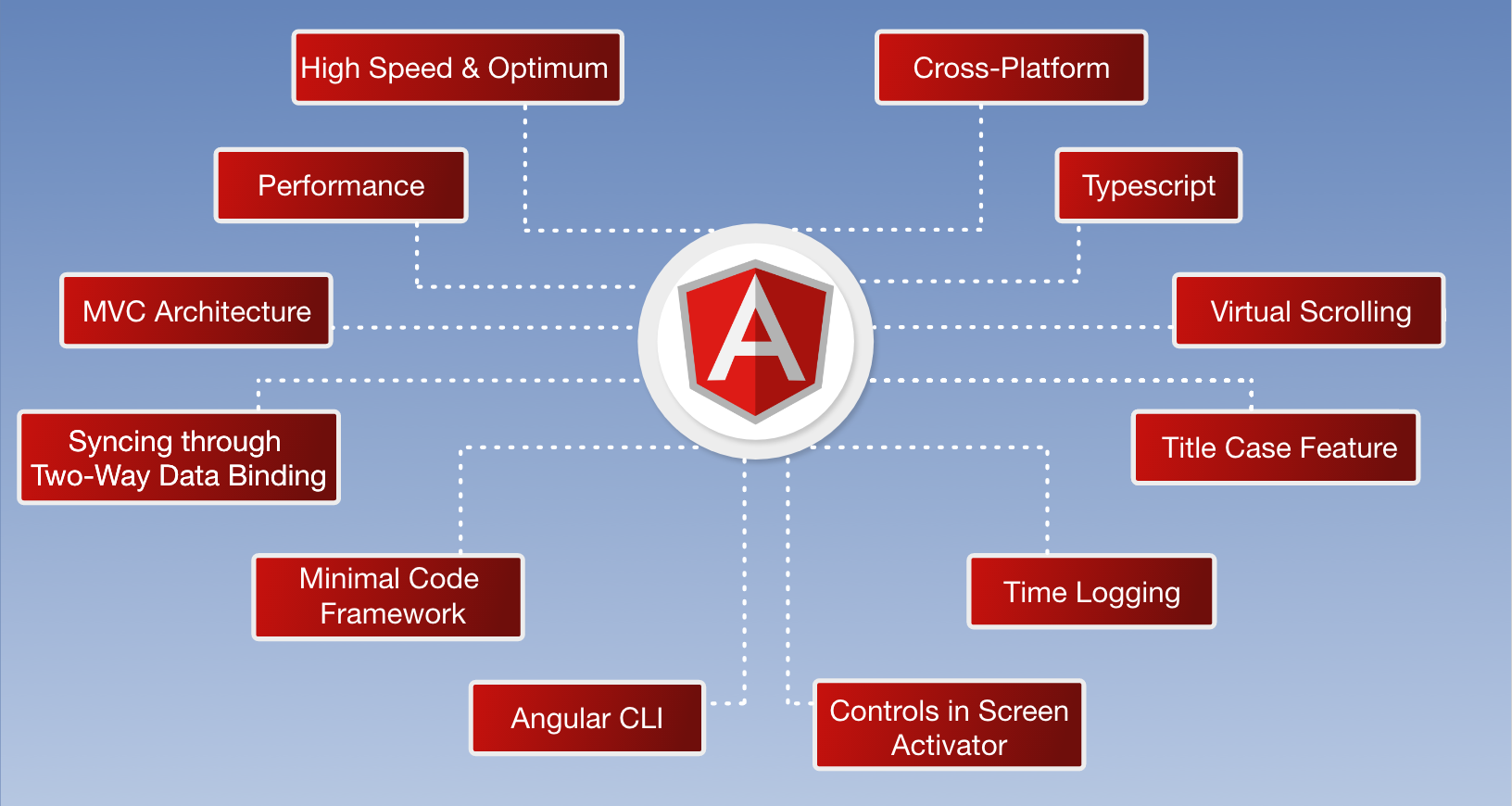
    Key Features of AngularJS

    1. Cross-Platform Development

    Angular supports cross-platform development, allowing developers to create applications that run smoothly across multiple devices and operating systems.

    Developers can also build Progressive Web Apps (PWAs) using Angular. These applications provide an app-like experience within a browser and can run on desktops, tablets, and mobile devices.

    Cross-platform development ensures consistent performance and user experience across different platforms.

    2. High Speed and Performance

    Angular applications are known for their fast loading speed and high performance. The framework optimizes the rendering process and efficiently converts code into browser-friendly structures.

    Angular can also integrate easily with backend technologies such as:

    • Node.js
    • PHP
    • .NET

    Another powerful feature is automatic code splitting, which loads only the components required for a specific user interaction. This reduces loading time and improves application performance.

    Businesses building scalable digital platforms often rely on enterprise web development services to implement optimized Angular applications.

    3. MVC Architecture

    Angular follows the Model-View-Controller (MVC) architecture that separates application logic into three components:

    Model – manages application data
    View – handles the user interface and presentation
    Controller – connects the model and view while managing application behavior

    This architecture helps developers maintain a well-structured codebase and simplifies long-term maintenance.

    4. Two-Way Data Binding

    Two-way data binding is one of Angular’s most powerful features. It allows automatic synchronization between the application data and the user interface.

    When the application data changes, the interface updates instantly. Similarly, any changes made by users in the interface automatically update the underlying data.

    This feature reduces manual coding and significantly improves development efficiency.

    5. Minimal Coding Structure

    Angular reduces the amount of code developers need to write by automating many development processes. The framework automatically connects different components of the application.

    Because of this simplified structure:

    • Development becomes faster
    • Applications become easier to maintain
    • Scaling the application becomes simpler

    6. TypeScript Support

    Angular is built using TypeScript, an advanced version of JavaScript that improves code reliability and maintainability.

    TypeScript offers several advantages, including:

    • Strong typing
    • Improved debugging
    • Better code organization
    • Enhanced developer productivity

    These features help developers create scalable and reliable applications.

    7. Virtual Scrolling

    Angular includes virtual scrolling, which improves performance when handling large data sets.

    Instead of loading all elements at once, Angular loads only the elements currently visible to the user. This approach reduces memory usage and significantly increases application speed.

    8. Efficient Navigation and Routing

    Angular provides powerful routing capabilities that help developers control navigation between different pages or components.

    This allows developers to manage user flows efficiently while ensuring smooth transitions between application views.

    9. Angular CLI (Command Line Interface)

    Angular CLI is a powerful development tool that automates many common development tasks.

    With Angular CLI, developers can:

    • Create new projects quickly
    • Generate components and services automatically
    • Run development servers easily
    • Perform testing and debugging
    • Maintain code quality

    This tool greatly speeds up the development process and improves productivity.

    10. Directives for Dynamic UI

    Angular allows developers to extend HTML functionality through directives.

    Directives help manipulate elements, attributes, and behaviors within the Document Object Model (DOM). This enables developers to create highly dynamic and interactive user interfaces.

    11. Component Development Kit (CDK)

    Angular’s Component Development Kit (CDK) provides tools for building reusable user interface components.

    It includes features such as:

    • Virtual scrolling support
    • Performance optimization tools
    • Dynamic component loading

    These tools make it easier to build scalable and maintainable applications.

    12. Drag and Drop Functionality

    Angular also provides built-in support for drag-and-drop functionality, allowing developers to create interactive user interfaces for managing lists, dashboards, and data elements.

    This feature is particularly useful for applications such as task managers, project management tools, and analytics dashboards.

    Why Businesses Choose AngularJS for Web Development

    Angular has become a preferred framework for modern web development because it offers:

    • High performance
    • Scalable architecture
    • Simplified development workflow
    • Strong community support
    • Continuous updates from Google

    Many global brands and organizations use Angular to power their digital platforms due to its flexibility and reliability.

    Conclusion

    AngularJS remains one of the most powerful frameworks for building modern web applications. Its advanced features, efficient architecture, and strong ecosystem enable developers to create high-performance digital platforms.

    From startups to large enterprises, businesses use Angular to develop applications that are fast, scalable, and user-friendly.

    If you are planning to build a modern digital platform, working with an experienced custom web application development services provider can help you create scalable and secure web solutions.

    At Sifars, our expert developers build modern Angular applications designed to deliver powerful digital experiences and long-term business value.

    🌐 www.sifars.com